Discord Account Link
Linking your game account to Discord lets the server recognize your Discord profile and send in-game rewards for Discord-related activities. The first successful link also grants an  Old Memory Album.
Find the bot
Open Kafra bot from Discord members, the getting-started channel link, or the direct profile link below.
Generate a code
Open account settings in game and choose Discord linking. The code is valid for 10 minutes.
Claim reward
After linking, the reward is sent by in-game mail once per account.
Link reward
For linking your game account to Discord for the first time, you receive an Old Memory Album. The reward is delivered through in-game mail and can only be claimed once.
Step-by-step guide
Open account settings in game
Use the @settings command or click the account settings button near the mini-map in the upper-right part of the game screen.
 Account settings button near the mini-map.
Generate a Discord link code
In account settings, open Discord Integration and choose Link Account. The game will show a command in this format: gamelink YOUR_CODE. The generated code is valid for 10 minutes.
Open Kafra bot in Discord
You can find the bot in the Discord member list or through the direct link in the getting-started channel. If needed, open the bot directly here: Kafra bot .
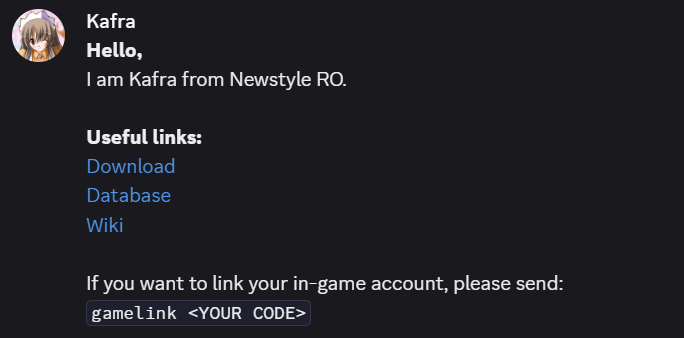
If you send any message to the bot, it replies with a greeting and reminds you of the command template.
Send the gamelink command to the bot
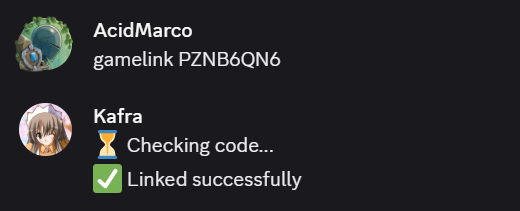
Copy the full command from the game and send it to Kafra bot in direct messages. It should look like gamelink PZNB6QN6, but with your own code.
If something does not work
- Make sure you send the command to the bot in direct messages, not to a public Discord channel.
- Use the newest code from the game. Old codes expire after 10 minutes.
- Send the command exactly as shown:
gamelink YOUR_CODE. - If the bot profile link does not open from Discord, try opening it in a browser: https://discord.com/users/1437225093133504622.
Recommended timing
It is best to link Discord early, right after reaching Prontera and checking promo codes. This way you claim the Old Memory Album reward before your account progression really begins. You can return to the First Steps guide afterward.