Battle Royale · Core Mechanics
Class Change: I
The first class change is the moment when a Novice chooses an initial combat class. Class scrolls do not appear immediately: the hunt begins in Zone 1, and the possible classes are determined by that match generation.
Begins at 03:30
At 03:30, special Scroll Carrier monsters appear in Zone 1. At the same moment, the class-selection panel opens on the left side of the screen.
Generated class pool
Before the match, 5 class lines are selected at random. Scrolls can only drop for the initial classes from this generated pool.
Guaranteed scroll
Every defeated Scroll Carrier guarantees one random class scroll from the available pool.

How to spot a Scroll Carrier
While the character remains a Novice and has not completed the first class change, Scroll Carriers in Zone 1 are marked by a special animated scroll effect above the monster.
This marker makes the priority target easy to distinguish from other monsters. After obtaining the first class, the effect is no longer shown.
Which scrolls can drop
Initial combat classes only
A scroll changes Novice into the initial class of the selected line. Enhanced forms do not drop from monsters: they are unlocked later through Class Change: II.
Each scroll is a random roll
The specific class is determined when the scroll drops. You may find the class you want immediately, or receive another class from the same pool.
Change class or keep hunting
You can use a dropped scroll immediately and begin developing the new class. If that class does not suit your preferred playstyle, you can wait and continue hunting Scroll Carriers.
Class-selection panel
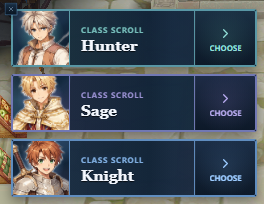
When the class-scroll stage begins, the panel appears on the left side of the screen. As scrolls are obtained, it fills with cards for the available classes.
The example shows three discovered options: Hunter, Sage, and Knight. Pressing the choose button uses the corresponding scroll directly from this panel.
This method is faster and easier to read than the classic inventory, but both methods use the same item and follow the same restrictions.
Use the panel
Select the class card on the left side of the screen. This is the fastest way to use a discovered scroll without searching for the item in your inventory.
Use the inventory
The scroll remains a normal game item. You can always use it in the classic way through your inventory.
Usage restrictions
You cannot change class through the panel while the character is stunned or frozen. The same restrictions apply when using the scroll as a normal item.
The panel can be closed
The button in the panel top-left corner hides it for the rest of the current match. It will not appear again, but all discovered scrolls remain in the inventory and can still be used normally.